Not a tab notebook, but a traceable customer account
Every business with corporate customers has the same headache: the end-of-month argument over “where did this amount come from?”. In Orderly, a customer account shows more than a balance.
Traceability down to the bill
You can track which bill was assigned to whom, together with the items on it and its history. The answer to “where did the 840 ₺ from March 15 come from?” is on screen in two clicks.
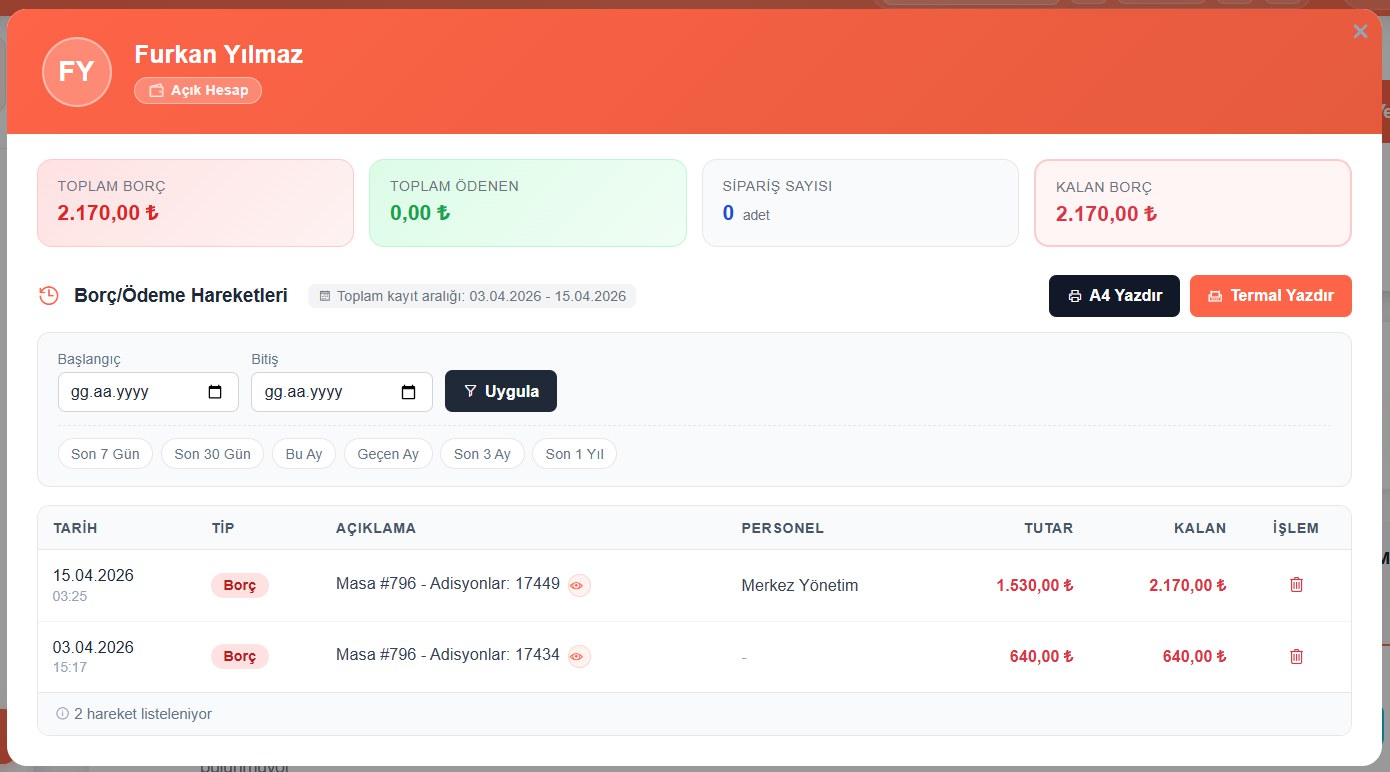
Historical balance movements
All balance movements are kept in date order. At the end of the month, a statement can be printed for the customer on the thermal printer.
Assigning to an open account is a separate permission
Not every staff member can put a bill on an open account; it's a separate permission and shows up as its own line in the end-of-day report.
About Customer Accounts & Open Tabs
Yes. The customer's transaction history can be printed on the thermal printer, with dates, bills and amounts.
Yes, as a separate line. On the end-of-day screen, the count and amount put on open accounts are listed on their own line alongside voids and comps, and the cash count is calculated accordingly.
You can. Putting a bill on an open account is a separate staff permission, and every action is written to the activity log with the staff member, date and bill.
Customer Accounts & Open Tabs included — everything in a single license
8,500 ₺ + VAT per year. Try free for 10 days, no credit card required.
You might also like
Free QR Menu & QR Ordering
The QR menu is free and fully integrated. Change a price in the system and it changes on the menu instantly.
Order & Table Management
Opening, moving and merging tables, splitting bills and partial payments — every service scenario covered.
Automatic Costing & Profitability
Just enter your purchase invoice; unit costs and every recipe cost update themselves.